

Time:2026-06-29
The Operational Friction of Complex Commercial Lighting Integration
Commercial managers face high costs when setting up smart building networks. Old systems need separate data lines and extra power packs. This complex layout drives up labor costs and delays project schedules. When parts from different brands do not work together, site teams face massive maintenance blind spots. Unstable bus voltages and missing energy data make it hard to track real efficiency. This lack of clear data ruins green corporate goals.
Using a structured dali d4i sensor connectivity implementation guide procedures framework fixes these integration problems. This modern design embeds smart data pathways directly inside each light fixture. By using a standard dali d4i sensor, field crews can build automated light zones without running external cables. LumiEasy offers a reliable path for next-generation smart buildings. Our certified hardware simplifies layouts, ensures full part matching, and streams clean data straight to your dashboard.
Modern property managers require smart building parts that provide clean data tracking and simple physical setup. The D4i standard upgrades the traditional digital addressable lighting interface design. It moves data management and network intelligence from separate central server racks straight into the individual commercial light fixture. This self-contained layout protects signal lines from outside noise and turns every fixture into a secure, standalone IoT asset.
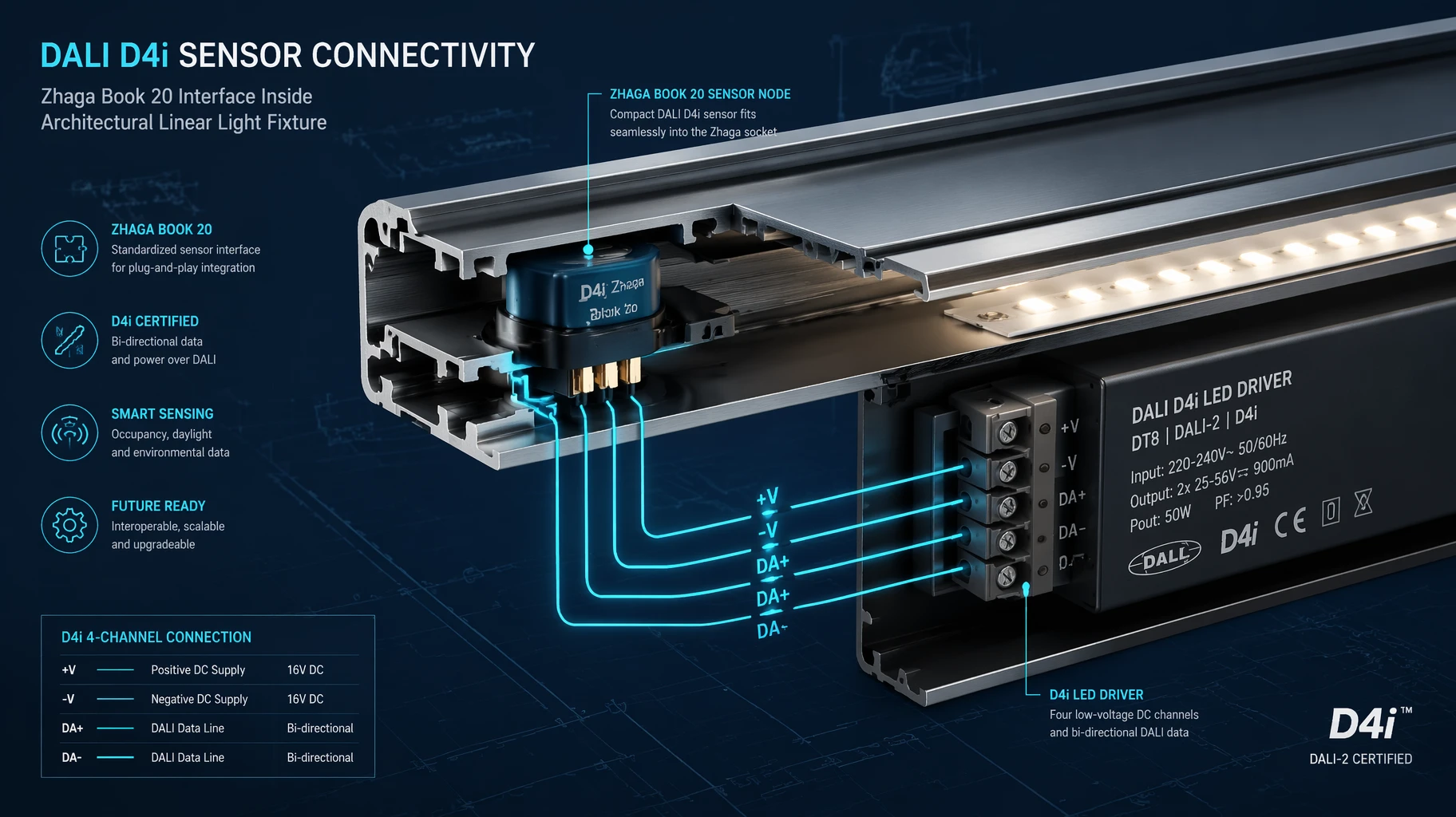
The internal system relies on a unified data bus to connect parts safely. Certified d4i drivers serve as the primary power and data hub for this internal network:
DALI Part 250 (Bus Power Supply): The driver features a built-in power supply that runs the internal communication lines directly. This built-in power path removes the need for extra external power packs inside the fixture shell.
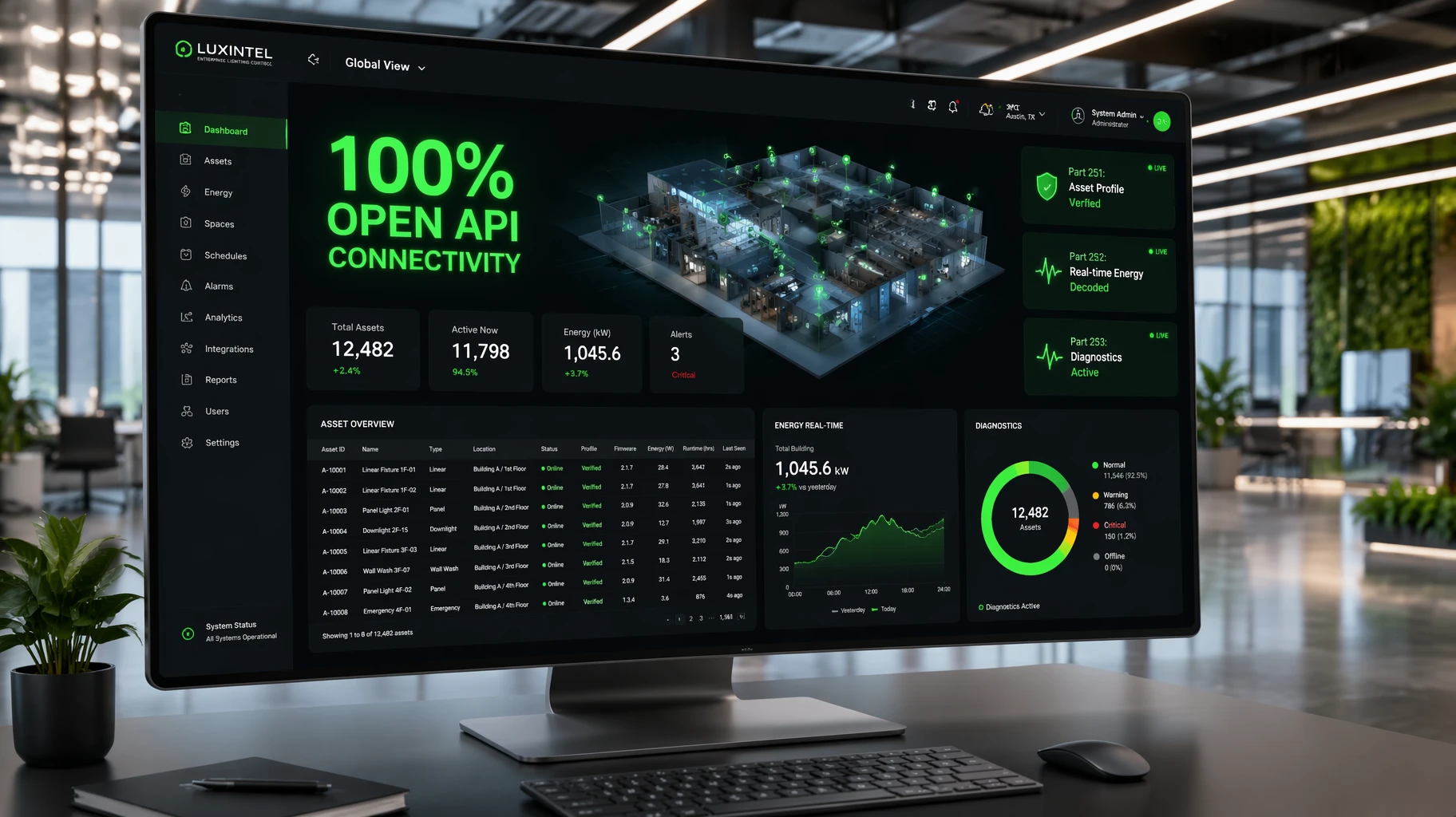
DALI Part 251 (Luminaire Asset Data): The driver houses secure digital memory banks that store vital factory details. This allows the hardware to report exact fixture wattage, lamp output, and color metrics to the network automatically.
DALI Part 252 (Energy Reporting Metrics): The driver tracks true electrical data day after day, recording active power use and real-time energy metrics across busy production cycles.
DALI Part 253 (Advanced Diagnostics): This smart framework logs internal heat spikes, voltage drops, running time counters, and specific light failures.
A compliant dali d4i sensor acts as a smart control device on top of this standard data network. Built to meet strict DALI Part 351 standards, these small sensors pull instant occupancy and ambient daylight readings from the surrounding room. They send quick control commands directly across the internal bus line. This local processing loop cuts down response lag, keeps system noise low, and gives management teams full clarity without requiring extra room controller boxes.
Deploying a smart luminaire network requires precise, organized connection practices. Errors made during initial hardware setup can corrupt system data logs, cause communication drops, or overload the internal bus.
Field installation teams should follow these step-by-step dali d4i sensor connectivity procedures to ensure clean data delivery and stable hardware performance:
Before mounting fixtures to corporate ceilings, check all component details. The main power supply must use certified d4i drivers with internal bus power turned on by default. Ensure the fixture housing features a standard socket interface, such as a Zhaga Book 18 or Book 20 base, to allow quick, plug-and-play sensor attachment.
A standard D4i driver provides an integrated bus current supply, typically capped safely at 250mA. Technicians must add up the exact current draw of every connected internal part. The combined power needs of your sensors and wireless gateways must never exceed the driver's output limit. If current demand is too high, engineers must adjust driver settings or add an auxiliary power module.
When attaching a dali d4i sensor to the fixture socket, align the structural pins correctly. Insert the device into the base firmly, then twist it clockwise to lock it securely into place. This smooth motion seals the internal rubber gaskets, creating a tight weatherproof barrier that blocks out heavy driving rain, dust, and morning moisture.
While at the assembly facility, production staff must program unique site data into the driver’s Part 251 memory banks. Technicians use software tools to write unique asset codes, precise map coordinates, and room zone identifiers directly to the hardware. This early data entry ensures that the moment the fixture receives line power on site, it shares its identity details with the central management platform instantly.
Once the physical installation is complete, activate the primary power breaker to start the system's automated discovery process. Use a digital configuration tool to verify that the sensor communicates smoothly with the driver. Run a quick dimming test to confirm the network responds perfectly to local motion changes and ambient daylight shifts before signing off on the project.
Moving from unmanaged traditional lights to a unified lighting control architecture brings huge commercial advantages to your real estate portfolio. Property managers can shift from slow, reactive maintenance models to highly efficient, data-driven facility operations.
| Operational Target | Old Lighting Control Networks | Unified D4i Sensor Infrastructure |
| Data Collection | None; requires manual spot checks. | Automated; tracks real-time energy and errors. |
| Maintenance Model | Reactive; relies on fault complaints. | Predictive; alerts teams to parts before failures. |
| System Wiring | Complex; needs long external data lines. | Clean; uses short intra-luminaire paths. |
| Asset Monitoring | Manual spreadsheets; prone to tracking errors. | Real-time digital identity and inventory tracking. |
Smart D4i networks track true active power consumption across specific zones, warehouse aisles, or commercial buildings. This steady data stream makes it easy to complete corporate carbon audits and satisfy regional green laws. Management teams can review precise operational logs to confirm exactly how much energy their site uses each day, helping them secure government green grants and utility cash rebates.
Every certified driver contains dedicated memory banks that store vital factory specifications. This secure database holds accurate asset identity codes, fixture wattage metrics, and runtime hours.
This layout simplifies your long-term asset management workflows. When an internal component fails, it sends its exact location and error code to the central platform, letting your crew fix the issue immediately without costly inspection visits.
Corporate buyers and engineering groups choose control hardware based on field durability rather than cheap unit pricing. Installing unverified sensors leads to rapid data drops, hardware lockups, and early failures that disrupt daily facility workflows.
When reviewing factory manufacturing lines and component suppliers, prioritize these technical milestones:
Official Alliance Verification: Ensure all parts are fully certified and listed in the official global database. This check guarantees true multi-vendor matching and full compliance with standard communication rules.
Low Standby Power Draw: Choose control parts that consume under 0.5 watts during idle hours to keep total building efficiency high.
Robust Surge Shielding: Select components built with strong electrical protection, including 4kV surge resistance. This shielding keeps systems running smoothly during grid voltage spikes or local weather changes.
Long Factory Coverage: Buy from manufacturing partners who provide a full five-year replacement warranty to guarantee reliable field service over years of heavy use.
Building a sustainable, future-proof property portfolio requires clean data tracking and smart automation. Following a structured dali d4i sensor connectivity procedures blueprint eliminates layout guesswork, protects your hardware investments, and reduces daily building energy consumption. These advanced networks turn standard light fixtures into intelligent data nodes that streamline facility operations and reduce overhead costs.
Do not let complicated setup choices, vendor lock-in, or poor component matching delay your building upgrade projects. Choose industrial-grade control solutions engineered for demanding commercial environments.
Are you ready to lower your operating costs, simplify your facility maintenance, and deploy compliant IoT lighting networks across your properties? For complete technical data sheets, bulk project pricing, or custom layout advice, contact our engineering desk. Visit our
A: Every LumiEasy dali d4i sensor carries official alliance certification. This rigorous testing ensures our devices work seamlessly with any certified driver, regardless of the brand. This open standard protects your project from vendor lock-in and guarantees clean data transmission across your entire property portfolio.
A: Older DALI-2 networks focus on building-wide communication, which requires external bus wiring and separate controller boxes. In contrast, D4i focuses on connections inside the fixture. This approach builds the data bus and power supply right into each individual luminaire, simplifying your layout and creating self-contained IoT nodes.
A: No. To read real-time energy use, diagnostic codes, and data for asset management, the fixture must use compliant d4i drivers. While LumiEasy hardware is backwards-compatible with standard loops, upgrading to a full D4i setup is required to unlock advanced smart data features and automated tracking.


)
)
)
)

+86 15899791249

+86 755 2955 3313


Address: Huafeng No.1 Science and Technology Park, Sanwei, Bao'an District, Shenzhen, Guangdong, China.
